Clarity keeps a supervisor on each identity. It reads each person's manager from your Source of Truth applications, works out which Clarity identity that manager is, and links the two. The supervisor is used wherever Clarity needs to know who someone reports to, such as access reviews, approvals, notifications and workflows.
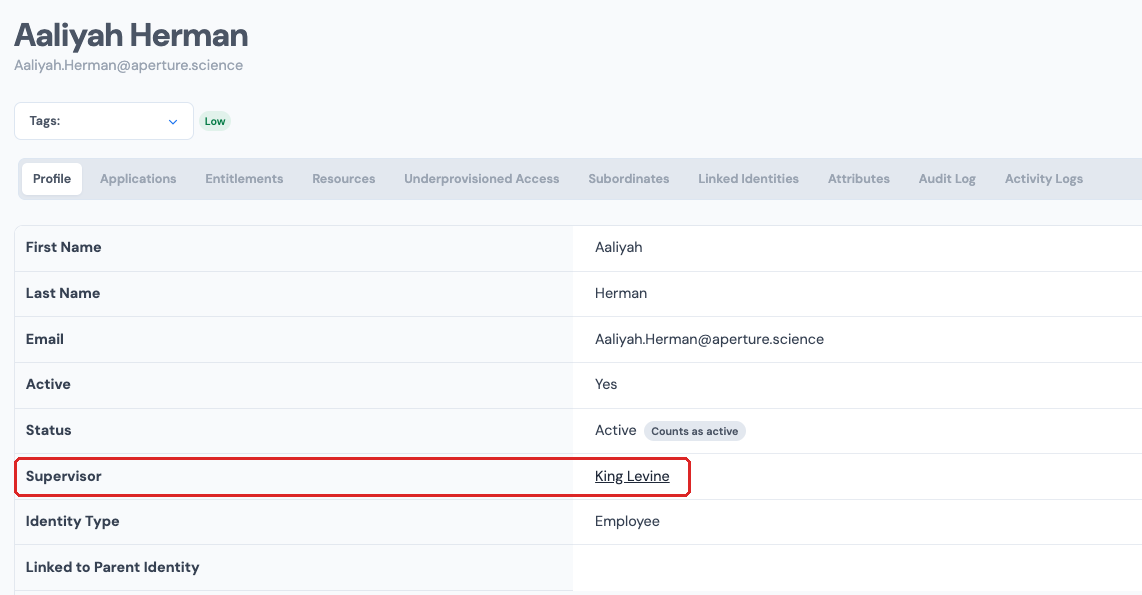
You can see an identity's supervisor on the Profile tab of the identity, in the Supervisor row.
Where the Information Comes From
Supervisor information comes from applications whose trust relationship is set to Source of Truth, usually your HR system or your directory (for example Active Directory, Entra ID or Okta). Each account in that application carries a manager field, and Clarity reads it on every sync.
Clarity does not store the manager's name or username, because those can change. It stores the manager's unique ID in that application. In Active Directory this is the manager's Object GUID. In an HR system it is the manager's ID in that system. The link therefore stays correct through name changes and moves between departments.
How the Link Is Established
On each sync, Clarity does the following for every account that has a manager:
Reads the manager's unique ID from the account.
Finds the account in the same application that has that unique ID.
Takes the identity that account belongs to and records it as the supervisor.
For the link to be made, the manager needs an account in the same application, that account must have synced into Clarity, and it must be linked to an identity. If the manager was added recently and has not synced yet, the supervisor is filled in on a later sync.
The supervisor is a person, not an account. If a manager has several accounts, for example a standard login and a privileged admin account, the supervisor still points to the one identity that owns them.
When More Than One Application Supplies a Manager
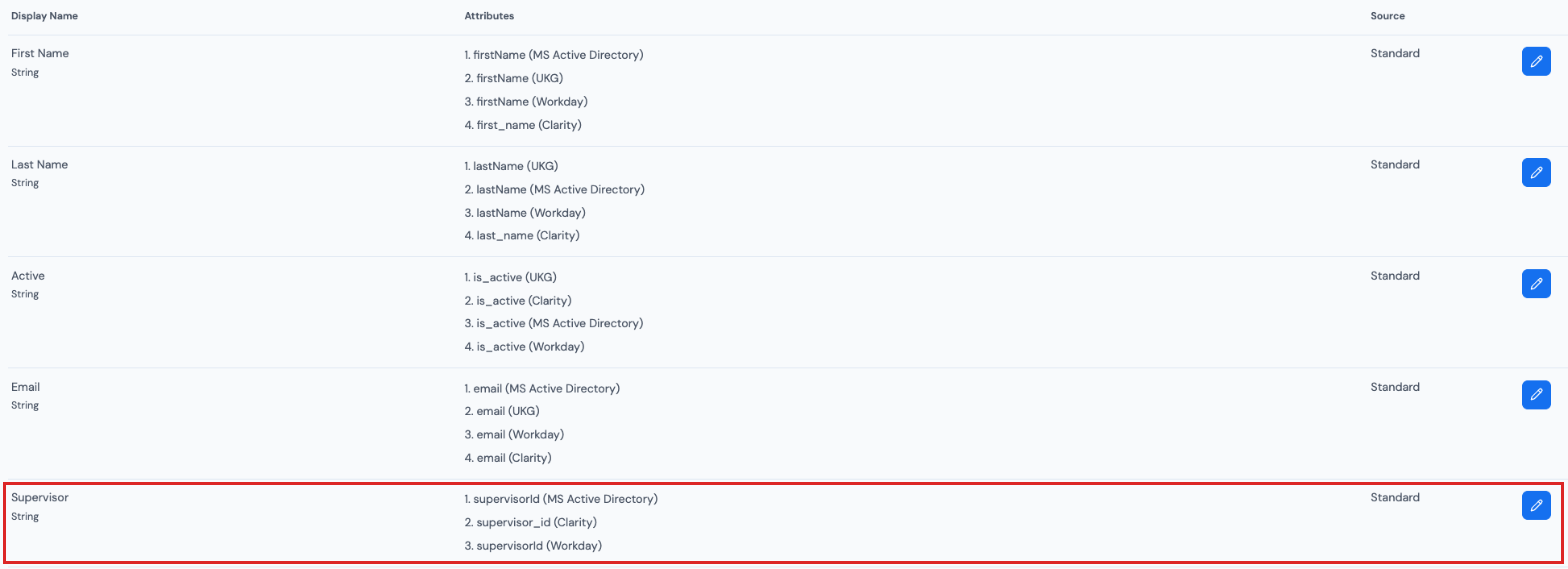
Supervisor is one of Clarity's standard identity attributes, so it follows the same priority rules as the others. Go to Identities and open the Identity Attributes tab. The Supervisor group lists the applications that supply a manager, in priority order. When two applications report different managers for the same person, Clarity uses the one from the application highest in the list.
Administrators can change the order, or change which field an application supplies. Changes save as you make them. Click Refresh Identity Attributes when you have finished, so existing identities are updated.
Setting a Supervisor in Clarity
You can also choose a supervisor yourself in the Supervisor field when you create or edit an identity. This is how supervisors are set for identities that have no Source of Truth account, such as contractors or vendors created in Clarity.
For identities that do have a Source of Truth account, a supervisor set in Clarity may be replaced by the Source of Truth value, depending on where Clarity sits in the priority order. When that is the case, the edit form shows a note saying that your edits carry a lower priority than your Source of Truth applications. To change the supervisor for good, change the manager in the Source of Truth.
What Can Affect the Relationship
Factor | What it means |
|---|---|
Source of Truth setting | Only applications set as a Source of Truth supply supervisor information. A manager field in any other application is not used. |
Attribute priority | When more than one application supplies a manager, the order of the Supervisor group on the Identity Attributes tab decides which one is used. |
The manager's own account | The manager must have an account in the same application, and that account must be linked to an identity. A manager who exists only in a different application cannot be matched. |
Sync timing | The supervisor shows the Source of Truth as of the last completed sync. A manager change made in the Source of Truth appears after the next sync finishes, and access reviews and workflows that start after that use the new supervisor. |
Edits made in Clarity | A supervisor chosen in Clarity can be replaced by the Source of Truth value when the Source of Truth has the higher priority. |
If a Supervisor Is Missing or Wrong
Check the manager in the Source of Truth. Clarity shows what the application reports. If the manager is blank or out of date there, correct it there.
Check that the manager has synced and is linked to an identity. Search for the manager on the Identities page. If their account from the same application is not linked to an identity yet, the supervisor cannot be set.
Check the Supervisor group on the Identity Attributes tab. Confirm the application is listed, the correct manager field is selected, and the order is the one you expect.
Wait for the next sync. A change made since the last sync will not show until the next one finishes.
Need Help?
If you have any problems, contact your customer success team. You can also get in touch with our general support via email, open a support ticket. Our general support team is available Monday - Friday from 8:00 AM - 6:30 PM CST.